Every device disagrees.
We settle it.
Your dive computer runs fast. Your camera was never adjusted for the timezone. Your backup computer has its own opinion about what year it is. Your Apple Watch is right.
DeepSix Dive Log reads every clock, calculates the offset, and stores the correction permanently — so every timestamp in your log is accurate, and every photo lands exactly where it belongs on your dive.
A photo placed at the wrong time is a photo placed at the wrong depth.
A few seconds of drift is a rounding error. A photo that should be at 14.2m lands at 14.0m. Nobody loses sleep.
A few minutes and the last photos from the dive fall outside the window. You get a partial match and wonder why six shots are missing. The shark was real. The photo just doesn't know it was part of a dive.
A timezone error is silent and total. Camera bought in Tokyo, never adjusted for Cairns. Every photo from the Great Barrier Reef sits one hour ahead of the dive. None of them match. They're not in the log. Critter ID never runs on them. They have no GPS. They have no depth. They're just photos now — disconnected from the dive that gave them context.
Deltas are recorded on every dive — from the original device timestamps, never from an overwrite. Corrections are computed fresh each time, so adjusting an offset updates the result everywhere automatically.
Every device's timestamp is kept exactly as that device reported it. The delta between devices is recorded on every dive. Corrections are computed from those deltas at display time — not written back into the source data.
If your Shearwater runs 70 seconds fast, that delta is recorded on every dive it participates in. Adjust it once and the corrected view updates everywhere — because nothing was overwritten to begin with.
One toggle. Two realities.
Every dive with Apple Watch shows the offset between Watch time and dive computer time. Toggle "Use Watch Time" to see what the Watch recorded overlaid on the Shearwater profile — the horizontal shift between the two curves is the disagreement made visible.
Commit to Watch time and the profiles merge into one clean line. The delta is recorded. Every photo matched to this dive gets the corrected timestamp derived from it — the originals untouched.

Single profile. Watch time applied. Shearwater Perdix 2 clock offset: -160s — running 2 minutes and 40 seconds fast. Stored permanently.

Two profiles overlaid. Blue: Shearwater. Green dashed: Apple Watch. The gap is the 160-second disagreement — visible as a horizontal shift across the entire profile.
The Watch was right.
The backup computer that's never right.
Serious divers often carry a second computer — different brand, different algorithm, set it and forget it. It disagreed with the primary computer when you bought it and it still disagrees now. That's fine.
DeepSix assigns it to the dive, records its clock offset, and notes that it contributed zero profile samples. The decompression obligation is on record. The wrong timestamp doesn't corrupt anything — it's offset-corrected and clearly labeled.
It showed up. That's enough.
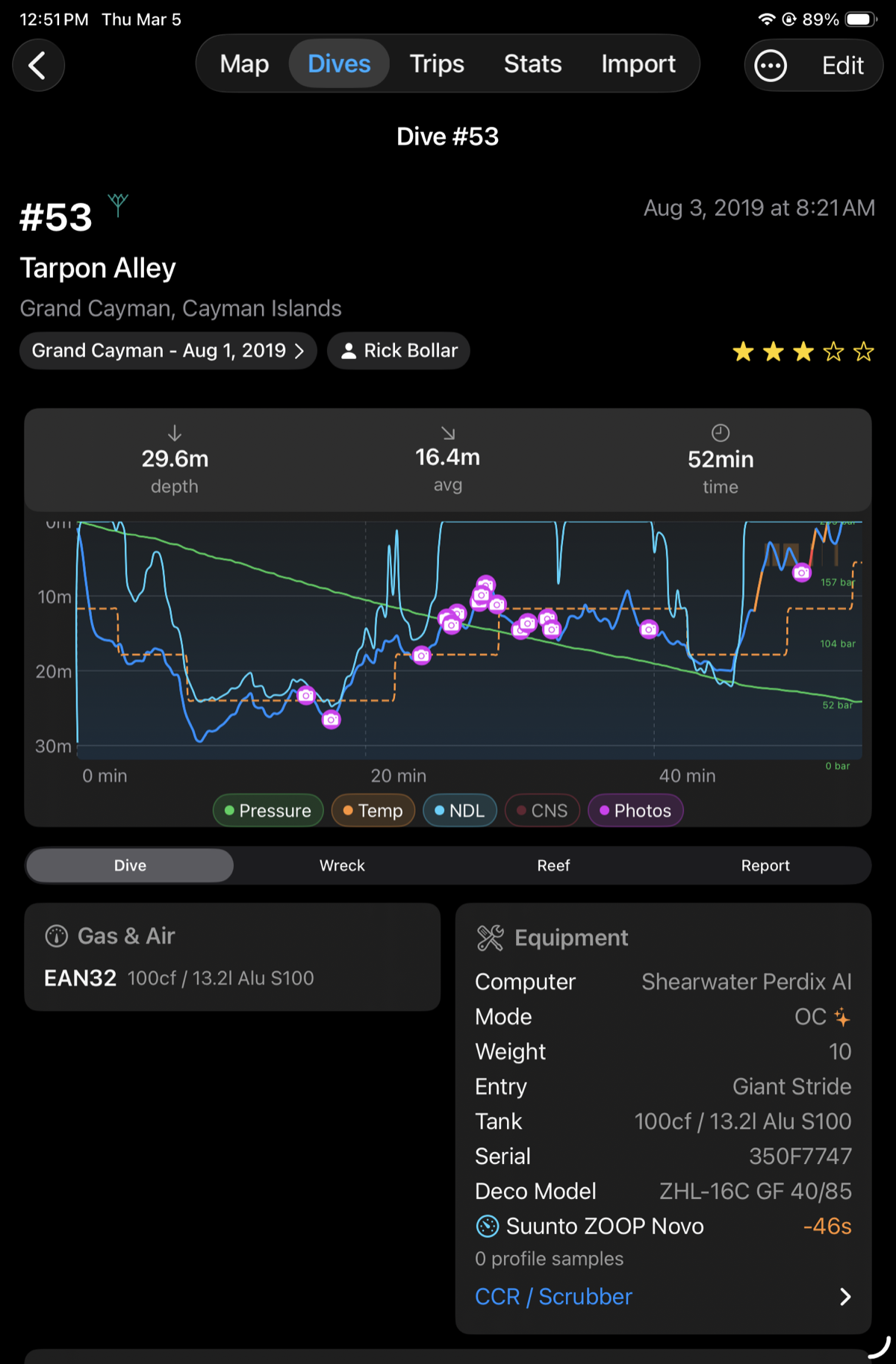
Dive #53 — Tarpon Alley, Grand Cayman. Primary: Shearwater Perdix AI. Backup: Suunto ZOOP Novo — 0 profile samples, clock -46s. Assigned to the dive. Offset recorded. Completely harmless.
0 profile samples.
The Suunto logged a dive. It just doesn't export a depth profile. The clock offset (-46s) is stored, the computer is assigned, and the Shearwater is the one on the graph.
Nothing breaks. Nothing is lost.
Every photo. Placed on the profile at the corrected time.
Once clock offsets are applied, matched photos appear as icons on the dive profile — at the depth and GPS coordinate where they were actually taken.
The Tarpon Alley dive shows 13 photos across 52 minutes, from a brief stop at 29m to the safety stop. You can see exactly when you paused at the cleaning station versus when you were moving. The shark photos cluster at the same depth band. That's not a coincidence — that's correct data.
Without clock correction, those icons would be somewhere else on the profile. Or not on it at all.
Every clock. One timeline.
Four sources, four clocks, one dive. DeepSix reconciles all of them — not just the primary computer.
Add as many computers as you dive with. Each one gets its own offset, its own profile (if it has one), and its own entry in the dive record.
The Watch is the tiebreaker when you have one — NTP-synced, independent, automatic. No Watch? Your iPhone camera is also NTP-synced. Photo matching captures the same clock error through a different path: the offset between the first photo's timestamp and the dive start. Either way, the computer's drift is recorded. The gap is only for divers with no Watch and no photos — in which case the computer's clock is taken at face value, timezone resolved, drift undetected. That's the honest limit.
The silent one.
Clock drift you notice. Timezone errors you don't — until you open the log and nothing matches.
A camera set to UTC+9 on a dive in UTC+10 puts every photo one hour after the dive ended. Not close. Gone. The shark photo sits in your library with no dive attached, no depth, no GPS. DeepSix never knew it was from a dive.
DeepSix tries to resolve timezone automatically before asking you to do anything. It works through four tiers: GPS coordinates on the dive entry resolve to an exact timezone polygon offline. If there's no dive GPS, the site coordinates are used instead. If there's no site GPS, a 70-country lookup table covers the common cases. If nothing else works, timezone is borrowed from a concurrent dive within the same 14-hour window — your buddy's Shearwater already resolved it.
When automation has enough information, it corrects silently. When it doesn't — liveaboard that crossed a boundary on day three, borrowed GoPro, camera that's been on Tokyo time since 2019 — DeepSix shows you the mismatch and lets you apply the fix manually per dive or per trip.
The resolved zone is also what you see. Every screen — the dive list, the detail page, photo tags — renders each dive in that dive's own local time zone, not your device's. A Sardinia morning dive reads as morning whether you're browsing from Cairns or Chicago. Even a site beyond territorial waters resolves to a sensible civil time zone instead of a raw nautical offset.
And when you download from a dive computer whose clock doesn't match your phone's, DeepSix says so: a non-blocking warning banner classifies the mismatch and offers to confirm the dive's time zone on the spot. It stays silent in the common everything-agrees case, and GPS only ever hints at a zone — it never applies one for you.
For dedicated dive cameras and Paralenz units, there's one more layer: DeepSix can scan your existing matched photos, detect a systematic offset between stored timestamps and what's in your library, and apply the correction retroactively across the whole trip. If enough photos cluster around a consistent error, it finds it.
If you've ever imported photos and had none of them match, timezone is almost certainly why.
Timezone offset and clock drift are stored separately. A camera can be +1 hour (timezone) and +45 seconds (drift) simultaneously — both applied at match time.
The EXIF timestamp is never modified. Corrections live in DeepSix, not in the photo file.
Your existing log. Already corrected.
MacDive stored timestamps differently depending on the dive computer. Shearwater saves local wall-clock time labeled as UTC — which means every Red Sea dive looks like it happened in London. Suunto and manually-entered dives store true UTC with a real IANA timezone attached.
DeepSix handles both on import. Shearwater dives get the device timezone subtracted out. Suunto dives are left alone. The raw timestamp is preserved alongside the corrected one — so if the import logic ever needs to be reapplied, nothing is lost.
If your MacDive log has 385 dives from a decade of travel, they arrive in DeepSix with their timestamps already correct. The four-tier timezone resolver then runs over any that still need GPS-accurate refinement.
Your log should know what time it was.
Clock drift stored per device. Timezone resolved automatically where possible, manually where not. Every photo lands where it belongs.
Download on the App Store → Testers: TestFlight →- Achievements →
- AI Features →
- Apple TV →
- DeepSix Dive Log on Mac →
- Garmin FIT Import →
- Gear & Kits →
- GPS Extraction →
- Interactive Dive Map →
- MacDive Import →
- Marine Life ID →
- Photo Color Correction →
- Photos & Memories →
- Reef Context →
- Smart Lists →
- Suunto JSON Import →
- Tides & Conditions →
- Translations →
- Trip Planner →
- Wonders →
- Wrecks →