The ocean took the color.
We put it back.
Water absorbs light by wavelength. Red is gone by 5 meters. Orange by 10. Yellow fades through the teens. Below 20 meters everything your camera captures is blue-green — regardless of what your eye saw.
DeepSix Dive Log knows the depth of every photo. It corrects each one accordingly.
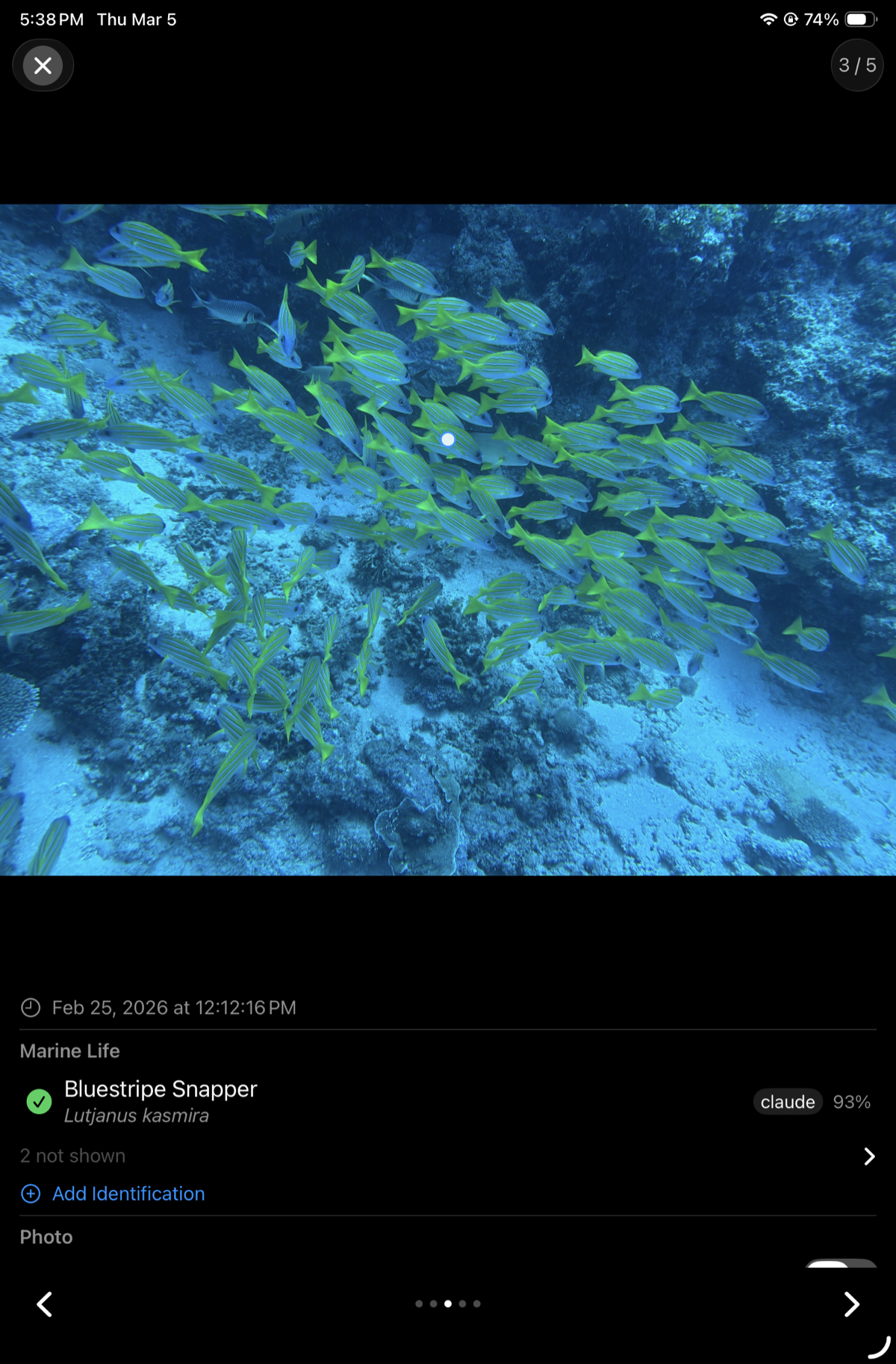
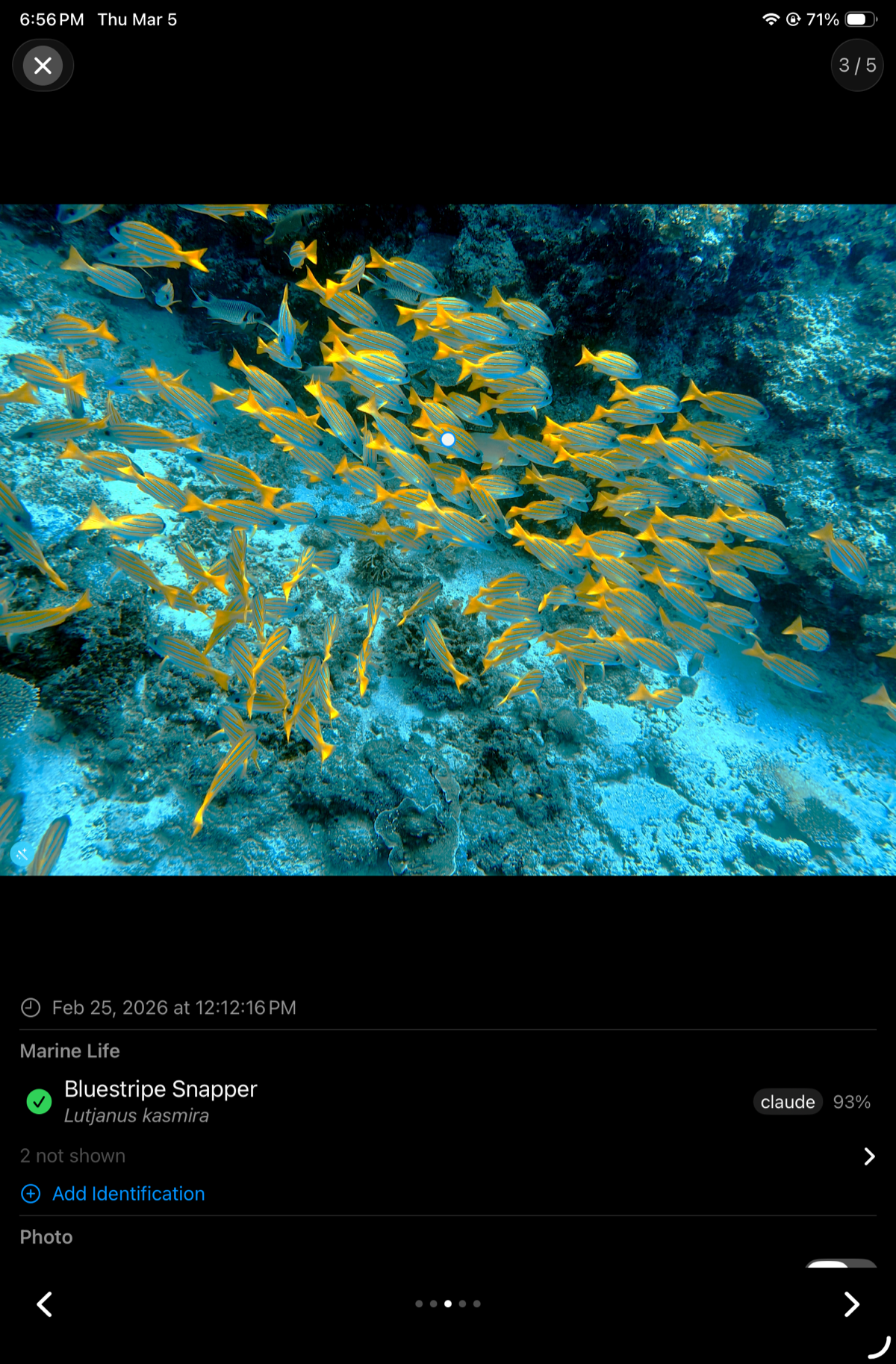
Bluestripe Snapper — Lutjanus kasmira — 19.2m
Drag to compare. The yellow was always there.
Water is not a neutral medium.
Light travels in wavelengths. Water absorbs the long ones first.
Red is essentially gone by 5 meters — which is why blood looks green underwater and why your coral photos look gray. Orange follows by 10 meters. Yellow fades through the mid-teens. By 20 meters, a camera capturing "white" coral is really capturing blue-gray — because there's nothing else left to capture.
Your eye compensates in real time. Your camera doesn't.
Depth-calibrated. Camera-aware. Non-destructive.
Every matched photo has its depth recorded at the moment it was taken — interpolated from the dive profile at the corrected timestamp. DeepSix uses that depth to scale the correction continuously: a photo at 2m gets a light touch, a photo at 20m gets full correction, and anything above 1m is skipped entirely. Safety stop selfies and boat shots come through untouched.
The pipeline goes further than basic hue rotation. Cross-channel blue amplification prevents the flat, washed-out look that simple auto-correction produces. A contrast S-curve, saturation adjustment, and sharpening pass add the pop that depth-corrected images need to look like what you actually saw.
Camera profile changes what correction is applied:
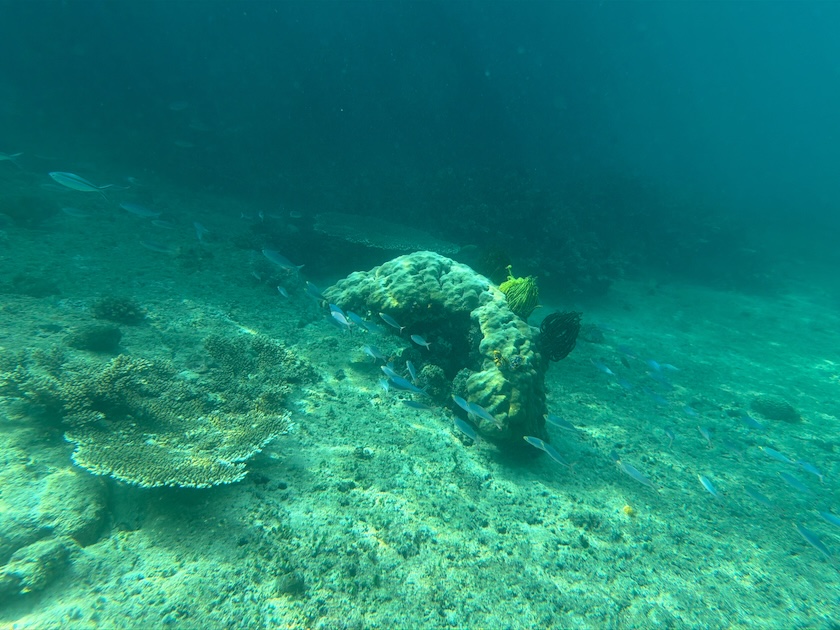
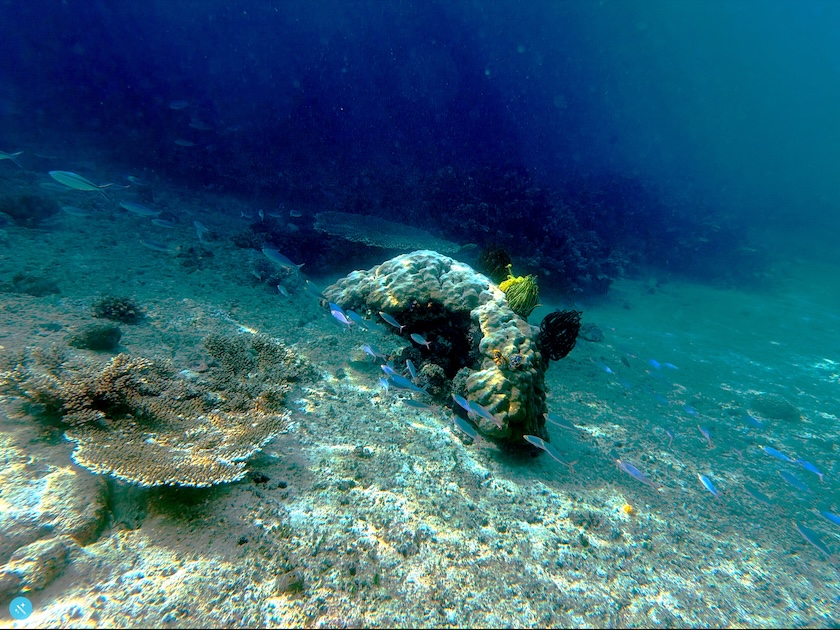
Same photo. Same depth. The difference is knowing where you are in the water. Drag the line. Swipe to compare.
Bleached coral stays white. At 3.3m the correction is light — only 24% of full gain. Not enough to warm sand pink or turn water purple. Not enough to invent color in coral that expelled its zooxanthellae. A depth-unaware algorithm applies full correction at 3.3m the same as 30m. The sand goes pink. The bleaching disappears. The record is wrong.
Color correction restores what water absorbed. It cannot restore what isn't there.

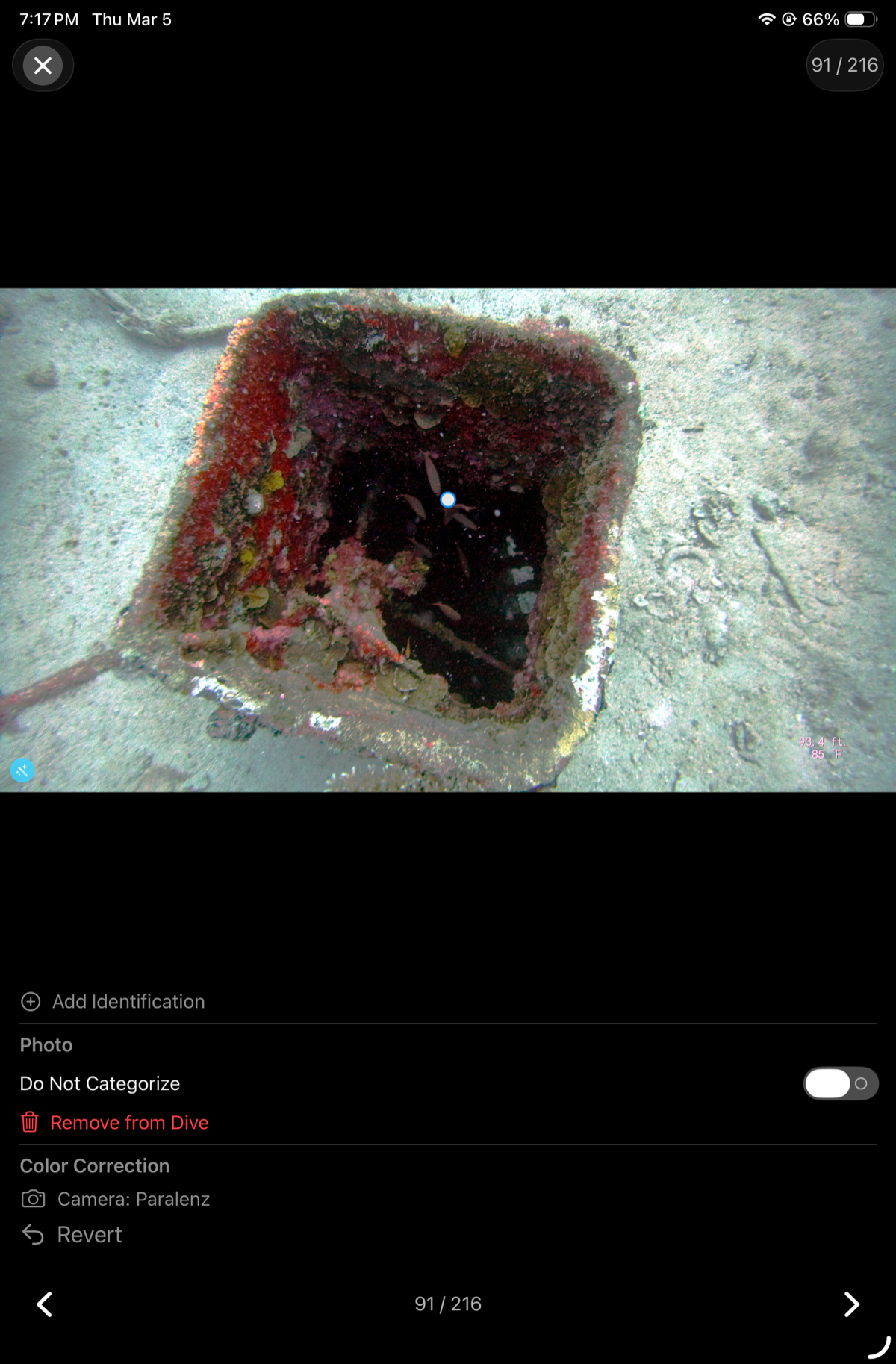
Paralenz camera, 28.5m — wreck hatch, Chuuk Lagoon.
The red sponge and pink algae were there the whole time.
Paralenz cameras did something impressive: real-time color correction in a tiny sealed housing with minimal compute. DeepSix acts as a second pass on top — picking up what the camera left on the table.
Raw sensor → Paralenz onboard processing → DeepSix correction
The pipeline works because the Paralenz's residual green cast is uniform: sand, water, and structure are all equally green. A uniform cast is exactly what hue rotation fixes. The 25% multiplier treats the Paralenz output as partially corrected and applies a lighter touch accordingly — enough to pull out the red sponge and pink algae, not enough to blow out the reds that are already there.
All of it runs on device via Metal. No internet required.
The original photo is never modified.
Correction is stored as adjustment data alongside the photo — not written into the pixels. Tap Revert and the original is restored immediately. Your Photos.app library is untouched. DeepSix can re-correct with an updated algorithm at any time.
Because DeepSix uses Apple's standard PHAdjustmentData, you can keep going in Photos.app — adjust exposure, crop, fine-tune color — and the two sets of edits stack cleanly. Everything stays in your library, works across your devices, and is exactly as editable as any other photo you've taken.
Color correction builds on the open-source underwater-image-color-correction library by nikolajbech. DeepSix extends it with depth-adaptive scaling, camera-aware profiles, cross-channel amplification, and a full post-processing chain.
Your red filter is doing half a job. We do the other half anyway.
Try one dive without it. Go to Settings, tell DeepSix you removed the filter, and let the algorithm work. You might not go back.
The correction is only as good as the photo.
Skip the red filter. DeepSix reconstructs the red channel computationally. A physical red filter on a GoPro forces DeepSix to skip hue correction entirely — the filter already compensated, and double-correcting produces a magenta cast. You're paying for a filter to do half a job.
Get close. Water between you and the subject scatters and absorbs. No post-processing recovers contrast lost to backscatter. The correction restores color; it doesn't restore detail that distance already destroyed.
Shoot shallower when color matters. A fish portrait at 8m will always beat the same shot at 25m. The correction is stronger at depth because it has to be — but less absorbed means more to work with.
Let DeepSix know your camera. Paralenz is detected automatically from EXIF. If you shoot with a GoPro red filter, set it once in Settings. Getting the profile right changes which correction path runs.
Surface shots are skipped. Photos taken above ~1m get no correction — there's nothing to correct. Boat shots, entry photos, and surface intervals come through untouched.
See the correction before you commit.
Tap Correct Colors on any photo to open a fullscreen live preview. Drag the 2D control to adjust hue restoration and saturation — the image updates instantly, rendered on the GPU via Metal. No loading bar. No commit-and-hope.
When it looks right, apply to this photo or every photo in the dive with one tap. The same physics-based depth correction runs on each one — same algorithm, same camera profile, same water type. Just the depth changes.
4K underwater photos render in under a millisecond. Every drag rebuilds the full correction chain — Metal kernel, post-processing, blend — in a single GPU submission. No intermediate textures, no CPU round-trips.
Horizontal axis: hue strength. Vertical axis: saturation. The starting position is computed from depth and water type — drag from there. Your photo, your call.
Dial in the look on one photo, then apply to every photo in the dive. Same hue strength and saturation, per-photo depth adaptation still runs on each one.
Your dive videos.
Same correction. Same depth.
The same depth-calibrated color correction that runs on your photos runs on your videos. Depth-at-shot is known from the dive profile. The algorithm that restores the red channel at 18 metres doesn't care whether the frame is a still or a video.
Video correction uses AVFoundation's export pipeline — non-destructive, processed to a new file, original preserved. Camera profile detection (GoPro, Paralenz, generic) applies the same way.
Video correction exports to a new file — the original is never overwritten. Processed at full resolution.
The same Beer-Lambert attenuation model used for photos. Depth at the moment of recording, from your dive profile. Not a flat filter.
Water type tuning.
Depth-adaptive correction is live. Water type classification is captured but not yet wired in — tropical blue, temperate green, fresh water, and three intermediate tiers each have genuinely different absorption curves. Green-dominant water needs a different channel rotation than blue-dominant tropical. That tuning is the next pass.
See what was actually down there.
Download on the App Store → Testers: TestFlight →- Achievements →
- AI Features →
- Apple TV →
- DeepSix Dive Log on Mac →
- Garmin FIT Import →
- Gear & Kits →
- GPS Extraction →
- Interactive Dive Map →
- MacDive Import →
- Marine Life ID →
- Photos & Memories →
- Reef Context →
- Smart Lists →
- Suunto JSON Import →
- Tides & Conditions →
- Time Reconciliation →
- Translations →
- Trip Planner →
- Wonders →
- Wrecks →