Where the red went,
and how DeepSix brings color back.
Water soaks up red light first, then orange and yellow, so the deeper you go, the bluer and greener your photos come out. DeepSix Dive Log corrects that for every photo it matches to a dive, using the depth it was taken at. This page explains what it does, what it writes to your library, what we’ve measured, and why we think you’ll get better photos without a red filter.
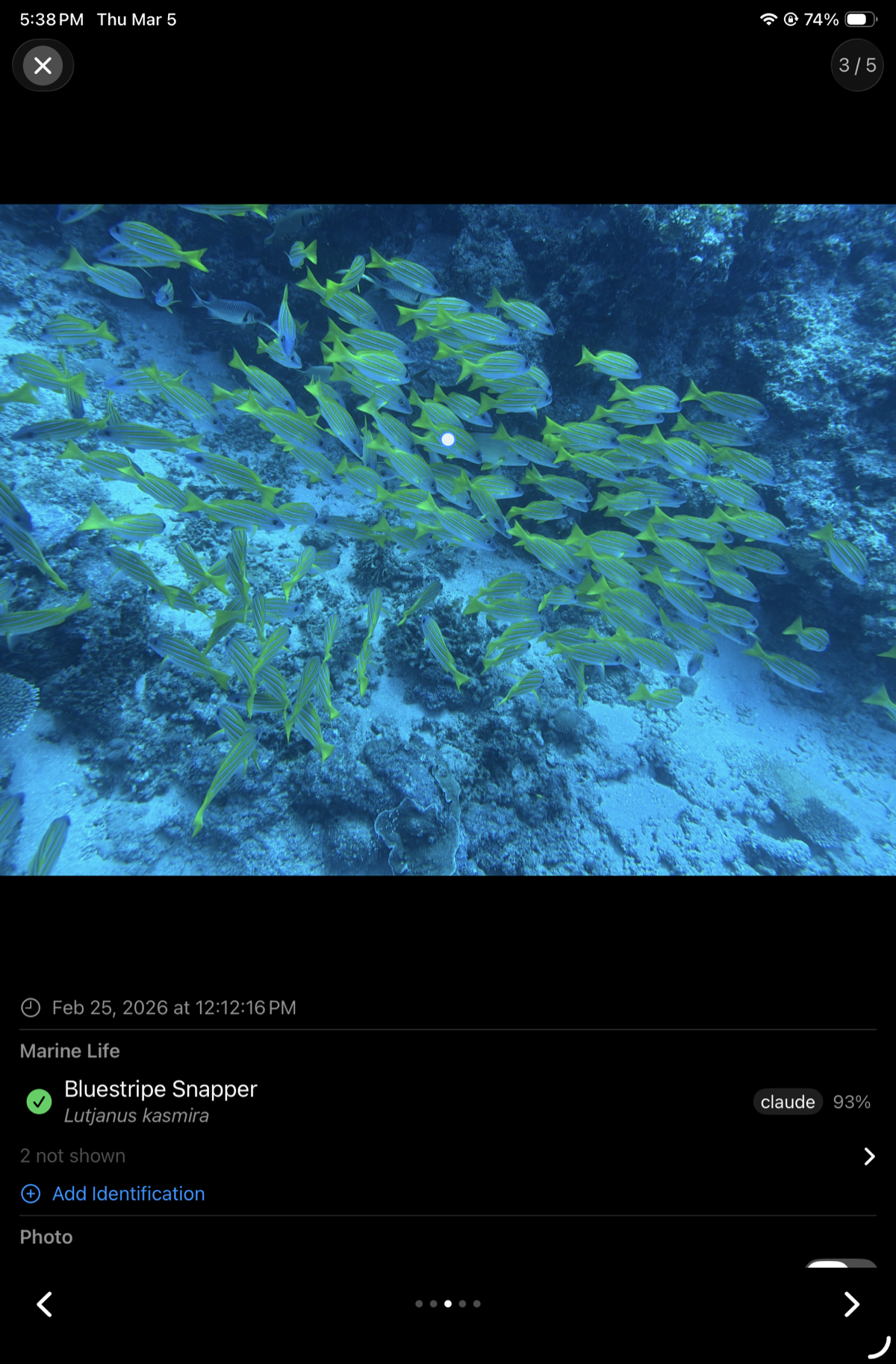
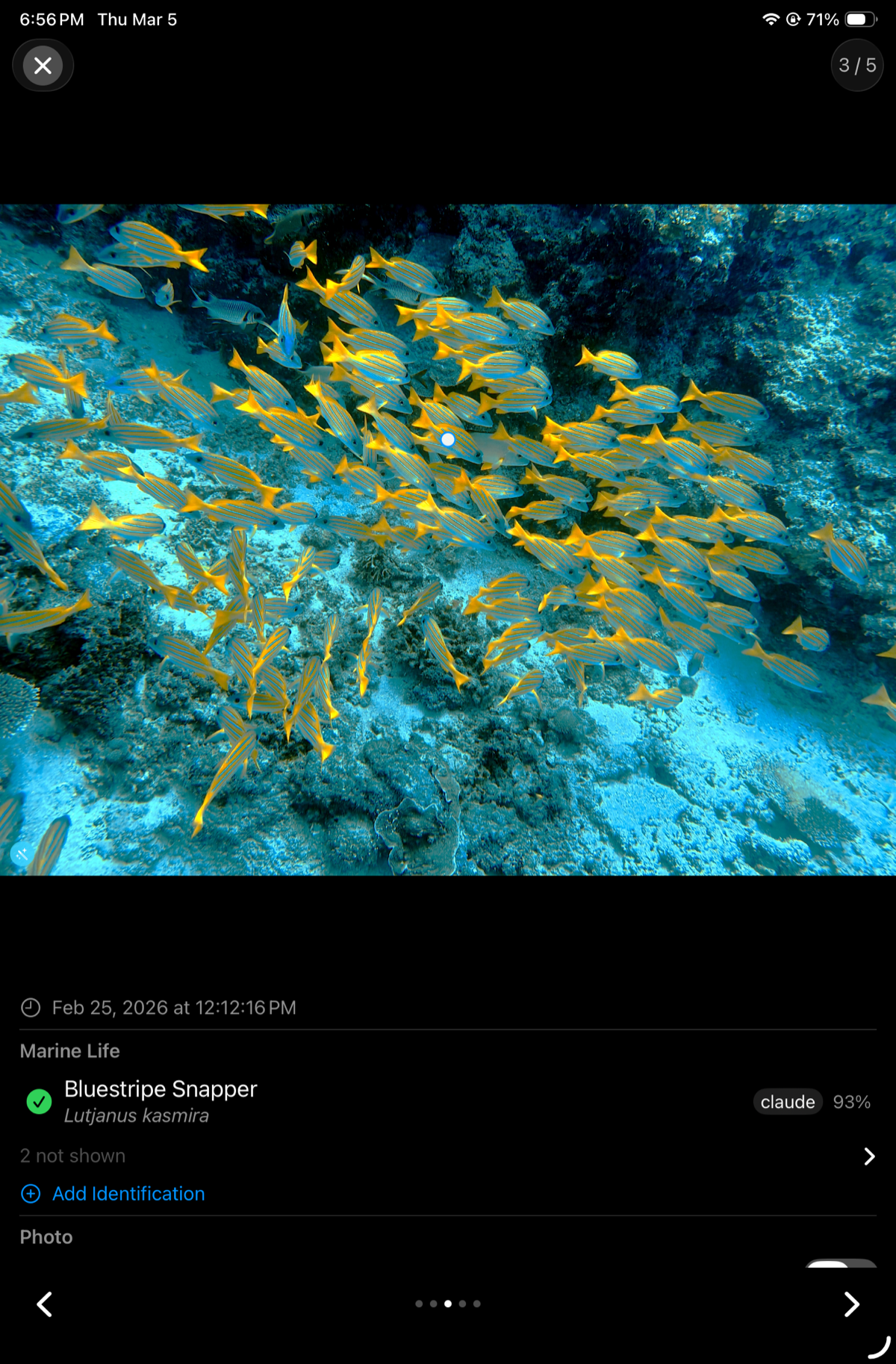
Bluestripe snapper, Lutjanus kasmira, at 19.2 m.
What DeepSix does to a photo
| 1. Measure the photo | DeepSix shrinks a copy of the photo and measures how much red, green and blue it holds. Everything that follows is worked out from this photo’s own colors. |
| 2. Rebuild the red | It turns the hue a degree at a time, moving green and blue into the red channel until red reaches a target level or the turn reaches 120°, then stretches each channel’s levels so the darkest pixels go black and the brightest go white. Steps 1 and 2 are Nikolaj Bech’s open-source method. |
| 3. Finish | A gentle contrast curve, a little more saturation and light sharpening. |
| 4. Set the strength for the depth | The corrected photo is blended with the original. How much depends on the depth the photo was taken at and on the water, using the Beer–Lambert law for how water absorbs light. A shallow photo gets a light touch; a deep one gets more. |
DeepSix starts from Nikolaj Bech’s open-source underwater-image-color-correction (GPL-3.0) and extends it substantially: the strength set by depth and water, camera profiles and red-filter handling, the finishing pass, frame-by-frame video, a live preview, and non-destructive edits in Photos. Our Swift and Metal port of Bech’s method is open source too, at underwater-color-correction-swift.
One thing worth knowing: at depth there is often no red left to recover. In a set of 312 photos from one diver’s log, iPhone photos taken at depth had no red at all. So DeepSix doesn’t find hidden red; it rebuilds it from the green and blue the camera did capture.
Depth and water set the strength
DeepSix decides whether the water is tropical blue, temperate green, murky or fresh from the dive site, its conditions and its latitude. Murkier water absorbs more, so it gets more correction at the same depth. Depth and water change how strongly the correction is applied, never which way the colors move. For photos, the strength stops at 75% by default, and you can take it further in the preview. Photos shallower than 1 m, and surface photos, are left alone.
| Depth | Tropical | Temperate | Murky | Fresh |
|---|---|---|---|---|
| 1 m | 19% | 30% | 41% | 14% |
| 3.3 m | 47% | 61% | 70% | 36% |
| 5 m | 58% | 69% | 74% | 47% |
| 10 m | 71% | 74% | 75% | 65% |
| 20 m and deeper | 75% | 75% | 75% | 74% |
Default strength, worked out from the app’s formula rather than measured on photos.
Your library, your originals
DeepSix saves each correction as an edit in Apple Photos, on iPhone, iPad and Mac. Your original stays in your library, and you can revert in DeepSix or in Photos at any time. A new correction always starts again from the original.
An edited photo also carries the dive with it: a short description with the dive number, site and depth, the dive’s details in the photo’s metadata, and, when the dive has coordinates, the dive’s location in place of the camera’s own, with the altitude set to the depth below the surface. If you share an edited photo, this information can go with it unless you leave it out. To leave out the location, turn it off in the share sheet’s Options.
The preview. Before you apply anything, a full-screen preview shows the result as you adjust it: hue and saturation on a pad, strength on a slider. Apply to Photo, or Apply to Dive for every photo from that dive.
Video is corrected the same non-destructive way, on iPhone, iPad and Mac, with the strength following the depth through the clip and the same strength rule as photos.
The red filter question
We think you’ll do better without one. A red filter tints the whole frame by the same amount, whatever the depth, and it’s tuned for a range of depths and one color of water: too strong in the shallows, not strong enough deeper down. It also cuts light, so the camera has to work harder. DeepSix sets its strength for each photo’s depth and water, and you can still adjust it afterward. You can’t take a filter off a photo once it’s taken, and that limits the post-processing that apps like DeepSix can do.
Lit photos are different. We’ve measured what DeepSix does to photos lit by a strobe or a video light, and its correction can’t improve them: the red comes out badly overblown, so leave lit photos uncorrected. If you’re shooting by someone else’s light, expect a photo that’s only partly lit, which is hard to save.
Try it yourself. On your next dive, take the filter off for some frames, and tell us which you prefer at [email protected] or on Discord.
If you shoot with a filter, tell DeepSix. It then skips its red-rebuilding step, because the filter already did that job, and still balances contrast and levels. Turn on Shot Through a Red Filter for the dive on its Photos card, or for one photo in the preview.
New in DeepSix 1.1: the red filter setting works with any camera. Set it for a dive, or flip it for one photo in the preview to see both versions. DeepSix also recognizes some cameras by name, such as the DJI Osmo Action, and tells you when a photo may already have been color-corrected by the camera. For a camera that may correct color itself and that DeepSix doesn’t have a profile for yet (today the DJI Osmo Action), it may ask you, once, to share a photo so we can improve the correction. Sharing is up to you, and you see exactly what’s sent first.
What we’ve measured
- No red left at depth. In 312 photos from one diver’s log, iPhone photos taken at depth had no red at all.
- Nobody preferred the uncorrected photo. In a blind test by September 2026, 8 people picked their favorite of five versions of 20 underwater photos: the original and four corrections. Across 160 votes, the original got none.
- Lit photos come out too red. Photos lit by a strobe or a video light get the same correction as ambient ones, and their red comes out badly overblown.
- We tried other methods. Four published methods for underwater photos, three of them AI models. None was better overall: Sea-thru had no red to work with, DDColor repainted the cast, FUnIE-GAN kept it, and U-shape did well in shallow green water but badly in deep blue.
Not measured yet: a filter against no filter, side by side; and how well the cameras that correct color themselves do.
Where it falls short
| Depth estimates | With the dive computer’s profile, DeepSix knows the depth when each photo was taken. Without it, it uses 60% of the dive’s average depth, which can be well off for a single photo. It matters most in the shallows, since strength levels off past about 10 m (later in fresh water). |
| Distance isn’t modeled | Light also travels from the subject to the lens. DeepSix uses depth, not how far away the subject was, and it can’t remove backscatter or recover contrast lost to distance. |
| Strobes and video lights | DeepSix doesn’t yet detect a strobe or a video light. A lit photo gets the same treatment as one in ambient light, and its red comes out overblown, so leave it uncorrected. |
| Mixed light | A lit foreground against a blue background gets one correction for the whole photo, so the two can’t be treated differently. Not measured. |
| Very deep, very blue photos | The hue search stops at 120°. In our test set of 294 iPhone photos, 13% reached that limit, and they may stay a little cool. |
| Video | One set of colors is worked out for a whole clip, from 10 sample frames, and the strength follows the depth through the clip. A clip that changes scene a lot gets an average. Video is corrected on iPhone, iPad and Mac, with the same strength rule as photos. |
| A starting point | People disagree about how a corrected photo should look, which is why the preview lets you change it, and Apply to Dive carries your choice across a whole dive. |
For the feature overview, see Color correction.